


How To Check Order History?
鸿财
Updated at: a year ago
How To Check Order History?
Spot Trading is an avenue of BitTNT where users have the option to trade a variety of coins on the live market rates. In Spot Trading, users trade their coins instantly on the go without any leverage or interest rate. There are 3 types of Spot Trading options given by BitTNT, these 3 options are:
Market Orders
Limit Orders
Trigger Orders
Each of these orders have their speciality in Spot Trading, where users have the option to place any of them. For every completely executed trader, the Order History is saved on the exchange, for the users to track all their trades. To check your Order History, follow the simple instructions:
Login to your BitTNT account.
Once logged in, scroll to the Trade option available in the header.
Here click on the Spot option.

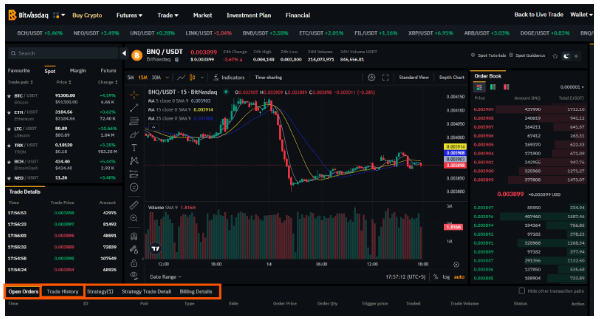
Once in the Spot Trading interface, scroll to the bottom of the candlestick chart.
Here there are multiple options available.
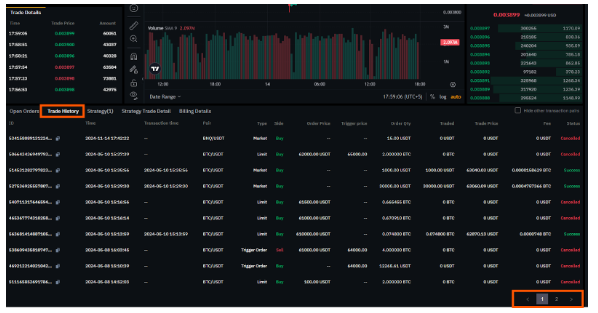
Out of these options select the Trade History.
Once in the Trade History tab, users can scroll through their entire trade history of Spot Trade, for all 3 types of the Spot Trading, including Market Orders, Limit Orders, and Trigger Orders.
This organizes Spot Trading for all the users, making BitTNT a user-friendly platform for all trading with all the features needed for smooth operations. Head out to BitTNT now, and to Spot Trading.